2026
Semantic Image Search
Describe a photo and find it among 20,000, with CLIP running entirely in your browser.
Personal project
Type a description and this finds matching photos among 20,000, without a single request to a server. The model, the index and the search all run in your browser, so what you type never leaves your device. Pick an example below, or describe something of your own:
Photos from the Open Images dataset, each licensed CC BY 2.0 by the credited author on Flickr. Tap a credit to see the original.
The examples load instantly. Your own first search downloads the text model (about 64 MB, once); after that each search takes tens of milliseconds.
How it works
- Every photo was turned into a 512-number "embedding" by CLIP ViT-B/16, a model trained to put images and their descriptions close together. That ran once, offline: 20,000 photos in under four minutes on a MacBook GPU.
- When you search, your browser downloads CLIP's text encoder, the half of the model that reads language, as an 8-bit ONNX file through transformers.js. It turns your query into the same kind of embedding.
- The browser then compares your query with all 20,000 photo embeddings (a dot product each) and shows the closest 24. On my laptop, reading the query takes 15 to 45 ms and searching every photo takes about 10 ms.
- There is no backend. The site serves static files: thumbnails, a 10 MB index and the photo credits. Hosting costs almost nothing, and there's no API bill per search.
The data
The photos come from Open Images, a Google dataset of Flickr photos licensed CC BY 2.0. Every result shows its author and links to the original on Flickr. I took a random sample of 20,000 from the validation set. About one in six had since been deleted from Flickr, so I sampled extra to make up the numbers.
To measure accuracy I used a different dataset, COCO, where every image has five human-written captions.
Measuring it
The test: for each of COCO's 25,014 captions, rank all 5,000 COCO images and check whether the caption's own image comes out on top (Recall@1), or in the top 5 or 10. It's a hard test: many captions could fairly describe several images, but only one counts as right.
- CLIP ViT-B/16 found the exact image first 32.5% of the time, and in the top 10 68.2% of the time. The smaller ViT-B/32 scored 30.5% at the top spot. Both use the same text encoder size in the browser, so B/16 was a free improvement.
- I measured with the same 8-bit text encoder the browser downloads, not just the full-precision PyTorch model. It scores the same (32.5% against 32.6%), so the browser loses nothing to the smaller model.
Making the index small
Stored as standard 32-bit floats, 20,000 embeddings take 41 MB, too much to download for a demo. So I compared ways to compress them. Queries stay full precision; only the stored photo vectors are compressed:
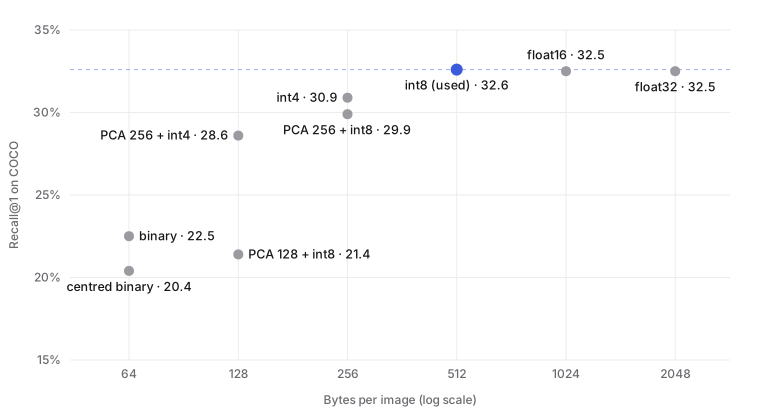
- 8-bit integers (int8, with a scale per dimension) cut the index to 10 MB, a quarter of the size, with no loss at all.
- 4-bit integers halve it again to 5 MB and lose 1.6 points.
- Reducing to 256 dimensions with PCA and then 4-bit integers gets to 2.6 MB for a 3.9-point loss.
- Binary codes, one bit per dimension, are 32 times smaller at 1.3 MB, but lose 10 points.
One result surprised me. A standard trick for binary codes is to centre the vectors first, so each bit splits its dimension in half. Here it made things worse, dropping Recall@1 from 22.5% to 20.4%. My first suspicion was dataset shift, since I'd fitted the mean on the Open Images photos and tested on COCO. But fitting it on COCO itself gave the same result. CLIP's image embeddings sit in a narrow cone (their average vector has length 0.70 when each embedding has length 1), and in this case the sign of the raw vector kept more of what matters for ranking than the sign of what's left after centring. A trick being standard doesn't mean it will work on your data.
What I shipped
The text encoder is 64 MB whatever I do, so shrinking the index from 10 MB to 1.3 MB would barely change the download, but would cost 10 points of accuracy. The int8 index is lossless and the obvious choice.
The page also stays light until you need more:
- The example searches were run in advance and saved with their photo credits, a 43 KB file, so the page shows results immediately without downloading any model.
- The model, the index and the full list of photo credits only download when you run your own search.
- Thumbnails are WebP files 320 pixels on the longest side, about 13 KB each, and are cached by the browser for a year.
Where it falls short
- It can only find what's in the sample. A random 20,000 photos covers dogs, food and boats well, but "a city skyline at night" finds very little worth showing.
- The first search on a phone is a 64 MB download, which is fine on Wi-Fi and slow on mobile data.
- CLIP learned from captioned images on the web, and it inherits that data's gaps and biases in what it recognises and how it describes people.
The code
The pipeline that downloads the photos, embeds them, evaluates every index format and builds the files for this page is in Python with PyTorch, transformers and ONNX Runtime. The browser side is a single React component using transformers.js.
Want to know more about Semantic Image Search?
The AI assistant on the home page can answer questions about it, or get in touch directly.
Ask the assistant about it →